
Post content
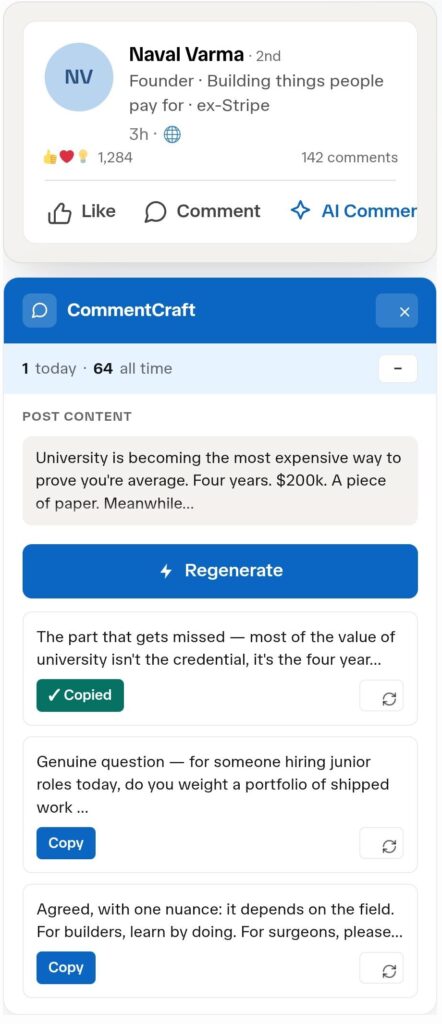
University is becoming the most expensive way to prove you're average. Four years. $200k. A piece of paper. Meanwhile…
CommentCraft learns your writing from comments you have already written. Then it drafts five angles for any post, in your voice. You pick one, edit it, and post it yourself.
For founders, creators, and consultants who comment consistently and do not want to sound like everyone else.
Used by 4,200+ solo operators, coaches, and B2B founders
4.9 on Chrome Web Store
Featured in Indie Hackers
Generic comments are fast to write and easy to ignore. Great post. Thanks for sharing. Completely agree. Nobody remembers who wrote them.
Writing something genuinely useful takes three or four minutes and real attention. Do that a dozen times a day and the day is gone.
Most AI tools solve the speed problem by making the second problem worse. The output is fluent, generic, and instantly recognisable as machine written.
comments a day to stay visible
to write a useful one from scratch
gone before you start real work
CommentCraft gives you a faster way to engage without lowering the quality of what you post.
Paste in ten to thirty comments you have already written. CommentCraft reads them and builds a profile of how you write: sentence length, how formal you are, your punctuation habits, the words you reach for.
After that, every suggestion comes back shaped like your writing instead of like a language model’s. You can preview it before you commit, and delete all of it whenever you want.
This is such an important point, and I think it applies far beyond hiring. The willingness to be wrong in public is genuinely underrated. Thanks for sharing this perspective.
Took me two years to learn this. The people who shipped badly and said so got hired. The ones who waited until it was good are still waiting.
Voice training reliably picks up your rhythm, formality, and phrasing. It will not replicate your sense of humour or your best arguments. Those are still yours to add.
Voice training is part of Pro. Free covers everything else.
Same post, one click, six usable angles. No fake enthusiasm, no hashtags, no buzzwords.
Generated in one click. Nothing edited.
The part that gets missed is that most of the value of university isn’t just the credential. It’s four years of low-stakes failure around smart peers. That is hard to replicate on the open internet.
Genuine question: for junior roles today, would you weigh a portfolio of shipped work above a degree, or does the degree still act as a useful tiebreaker?
Agreed, with one nuance: it depends heavily on the field. For builders, learn by doing. For surgeons, please go to school. The line keeps moving.
“The most expensive way to prove you’re average” is one of those lines that will stay with people.
Spent four years learning that meetings can also happen in lecture halls. Truly priceless.
I get the point, but some roles still need the foundation that structured education provides. Not everyone learns best by just doing, and a good program can accelerate that baseline
CommentCraft works inside the tab you already have open. Nothing runs in the background and
nothing posts on your behalf.

Add the extension and open LinkedIn. No API keys, no setup, no signup to try it.

Added to Chrome
Find a post worth engaging with and click the button in the action row. CommentCraft reads that post and nothing else.

Five angles appear. Pick the closest one, adjust it, and post it yourself. No auto-commenting, no auto-liking, no posting on your behalf.
Add the Chrome extension. No login, no API keys, no setup. Open LinkedIn and you’re ready to go.
Added to Chrome
When you find a post worth engaging with, click the CommentCraft button and open the side panel.
The post content is used to generate comment suggestions for that specific post.
CommentCraft gives you multiple comment angles in seconds. Pick the one that sounds closest to you, edit if needed, copy it, and post it yourself.
You stay in control.
Five angles per post, a contrarian option clearly marked so you only use it when it fits, and per-card regeneration when one suggestion misses.
Thoughtful, curious, agreeing with a twist, a short reaction, light humour, and a respectful contrarian take.
Trained on comments you have already written, so suggestions read as yours. Part of Pro.
Pushback starts the best conversations and is the easiest to get wrong. The contrarian option is labelled so you only use it deliberately.
Do not like one suggestion? Regenerate just that one and keep the rest.
When someone replies to you, CommentCraft reads the thread and suggests a response sized for a reply.
Your feed, someone's recent activity page, and individual post pages. Same button, same panel.
Keep a short list of the people worth commenting on, and a daily target that tracks whether you showed up.
No LinkedIn login, no posting permissions, no background activity
CommentCraft does not automate your LinkedIn activity.
It does not:
CommentCraft does not comment for you, like posts, send messages, send invites, or touch your LinkedIn login. It drafts options for the post you are already reading.
You choose what to use. You decide what to edit. You post manually
Free covers occasional commenting. Pro is for people who comment every day and want suggestions in their own voice.
No signup
Guest
Free account
Registered
Contact Us
Pay as you go
Credits
Unlimited monthly
Most popular
monthly
Unlimited annual
Annual
Best Value
Free
Most popular
PRO monthly
PRO Annual
Best Value
Getting noticed means appearing in front of the same people repeatedly. Most of us have ten or fifteen profiles actually worth commenting on, and finding them again every day is the friction that ends the habit.
Save those profiles with your own labels and tags. Note roughly when they post. Set a daily target and the times you usually comment, and the extension icon tracks your progress. A streak counts the days you show up, and one missed day does not wipe it out.
Saved profiles stay on your device. CommentCraft reads only the profile URL from the page. The name is whatever you type.
CommentCraft is an AI writing assistant (Chrome extension) that helps you draft thoughtful comment replies for professional networking. When you open a post, it reads the visible content and gives you several comment options to choose from — so you can reply thoughtfully without starting from a blank box.
When you click the CommentCraft button, it reads the post you are viewing and generates multiple comment angles based on it. The goal is natural, specific replies — not generic lines like “Great post” or “Thanks for sharing.”
Each generation gives you a range of angles so you can pick what fits:
Yes — and we recommend it. CommentCraft gives you a strong starting point, but your best comments usually include your own experience, opinion, or a small personal touch. You always copy and post manually, so you stay in full control of the final wording.
CommentCraft is built specifically for the LinkedIn commenting workflow. There are no prompts to write, no tabs to switch, and no copying posts into another tool. You get multiple comment angles right where you are reading the post — faster and more focused than a general chatbot.
CommentCraft is a Chrome extension that helps you write high-quality, contextually relevant LinkedIn comments. When you open a post, it reads the visible content and gives you several comment options to choose from — so you can reply thoughtfully without starting from a blank box.
When you click the CommentCraft button, it reads the post you are viewing and generates multiple comment angles based on it. The goal is natural, specific replies — not generic lines like “Great post” or “Thanks for sharing.”
Each generation gives you a range of angles so you can pick what fits:
Yes — and we recommend it. CommentCraft gives you a strong starting point, but your best comments usually include your own experience, opinion, or a small personal touch. You always copy and post manually, so you stay in full control of the final wording.
CommentCraft is built specifically for the LinkedIn commenting workflow. There are no prompts to write, no tabs to switch, and no copying posts into another tool. You get multiple comment angles right where you are reading the post — faster and more focused than a general chatbot.
Yes — main feed (Top and Recent), individual post pages, and the post detail dialog. When LinkedIn re-renders the feed or you change sort, the button re-injects automatically. You should never lose it.
It reads the visible post text, generates draft suggestions, and copies your chosen draft to your clipboard so you can paste and post it yourself. You still write the post yourself by pasting and clicking Comment. From LinkedIn’s side, nothing automated is happening.
A standard model on the free tier and an extended, higher-quality model on every paid tier. The extended model is noticeably better at picking up the post’s actual point instead of generic agreement. We don’t publicize the exact models because we swap them as better ones ship — the labels stay stable.
No accounts, no logins, no per-user analytics. We rate-limit anonymously by IP. The post text is sent to our backend (Cloudflare Workers, globally distributed) only when you click Generate, used to produce the comments, and immediately discarded. We never read your DMs, profile, or connections.
One click of Generate = 1 generation = 5 comments. Free tier gives you 30 generations a month (resets on the 1st). Paid credits are a one-time purchase — they don’t expire and they don’t reset. Use them at the pace that suits you.
Yes. Credits are tied to your license key, not to your install. Re-paste the key in Settings on a new install and you’re back where you were.
No. CommentCraft never auto-comments, auto-likes, sends DMs or connection requests, or posts on your behalf. It only drafts comment options for the post you are reading — you choose, edit, copy, and post manually. It is a writing assistant, not an automation tool.
No. CommentCraft works directly from your browser and never asks for your LinkedIn login. It does not control your account or perform any actions for you, so you stay in control of what gets posted.
No. CommentCraft is designed to avoid storing your LinkedIn activity, post history, or generated comments — post content is used only to generate suggestions for that one request. It is built for public posts, not your inbox, and does not access your DMs or private conversations.
CommentCraft is built for manual, user-controlled commenting rather than automated engagement, which keeps you in control of your account. LinkedIn can change how its platform works at any time, so we cannot guarantee how it may treat any browser extension in the future — but CommentCraft is intentionally designed to avoid automation.
No. It is not built for bots, spam, or fake engagement. It is for people who want to leave better manual comments faster — you still decide where to comment, what to say, and whether a comment is worth posting.
No account is required for the free version. You can install the extension and start generating comments right away.
One generation uses one credit, and each generation gives you multiple comment options for the post you are viewing. So generating comments for a single post counts as one credit.
The free plan includes 30 comment generations per month, forever. It is ideal for trying CommentCraft or using it occasionally without paying.
You can either wait for your monthly limit to reset or upgrade to a paid plan to keep going.
No. Credits from a one-time purchase never expire — you can use them whenever you want.
The unlimited plan is for people who comment regularly and want to generate comments without worrying about monthly limits. Fair-use limits may apply to prevent abuse or unusually high automated usage.
Yes. You can cancel anytime, and you will keep access until the end of your current billing period.
CommentCraft works on Chromium-based browsers including Chrome, Brave, and Microsoft Edge.
It is designed to work on most standard feed posts and individual post pages. Some layouts, promoted or restricted posts, or future LinkedIn interface changes may affect how the button appears or works.
It is for people who use LinkedIn seriously but do not always have time to write thoughtful comments from scratch. It is especially useful for:
Yes — you can use it to draft comment ideas, but you are responsible for reviewing and editing anything before posting. If you manage engagement for clients, we recommend adapting each comment to match the client’s voice.
CommentCraft is built to avoid generic AI-style comments. They are designed to be short, specific, and natural, and you can always adjust the wording before posting so it sounds more like you.
Right now it generates natural, human-style comments based on the post content. Saved tone and personal-voice features are planned for future versions.
Yes. We actively improve CommentCraft based on user feedback. Planned additions may include saved tone preferences, better personalization, more comment styles, and improved workflows for regular LinkedIn users.
A Chrome extension that helps you write better LinkedIn comments. Open a post, click AI Comment, and you get five ways to respond. You pick one, edit it, and post it yourself.
Free gives you 30 comment generations a month, five angles per post, replies, saved profiles, and streaks.
Pro adds two things: no monthly limit, and voice training. Voice training is the one that changes the output, because suggestions get shaped by comments you have already written rather than by a generic model.
Yes, on Pro. Paste ten to thirty comments you have written into Settings under Writing style. CommentCraft builds a style profile from them and shapes every suggestion to match your rhythm, formality, and phrasing.
It will not reproduce your humour or your best arguments. Those still come from you. You can preview the effect before committing, and delete your voice data whenever you want.
No prompt to write, no tab to switch, no pasting posts into another tool. And on Pro it is trained on your comments, so the output sounds like you rather than like a chatbot being asked to sound
human.
We do not publish the specific models, because we swap them as better ones ship. Free and Pro use the same base model. What Pro adds is no monthly limit and voice training.
Some of it, and only what the features need.
Post text is sent to our servers when you click Generate, used to produce the suggestions, and
discarded. We do not keep it.
If you create an account we store your email address, and a license key if you subscribe. We also generate an anonymous install ID so we can apply usage limits fairly.
Voice training samples stay in your browser by default. If you choose to analyse them or back them up, a copy is stored on our servers so your style survives a reinstall. You can delete all of it, on your device and on our servers, from Settings at any time.
Saved profiles, tags, and posting times never leave your browser.
We use product analytics to see which features get used, and you can turn that off in Settings. We never read your messages, your connections, or your profile.
No. It never comments, likes, sends messages, sends invitations, or posts on your behalf. It drafts options for the post you are reading. You choose, edit, copy, and post manually. It is a writing
assistant, not an automation tool.
No. CommentCraft never asks for your LinkedIn login and cannot perform any action on your account.
CommentCraft is built for manual commenting. It reads the visible text of a post, suggests drafts, and you paste and post them yourself. From LinkedIn’s side nothing automated happens.
LinkedIn can change how its platform works at any time, so we cannot make guarantees about how it treats any browser extension. What we can say is that CommentCraft is deliberately designed to avoid automation.
You can try CommentCraft without signing up. After that, a free account gives you 30 comment generations a month. Pro removes the limit and adds voice training.
Your monthly allowance resets on the first of the month, or you can upgrade to Pro at any time to remove the limit.
Yes. You keep access until the end of the billing period you have paid for.
It stays where it is and you can still delete it from Settings at any time. Voice training stops shaping new suggestions while you are not on Pro, and starts again if you resubscribe.
The free plan includes 30 comment generations per month, forever. It is ideal for trying CommentCraft or using it occasionally without paying.
CommentCraft works on Chromium-based browsers including Chrome, Brave, and Microsoft Edge.
It is designed to work on most standard feed posts and individual post pages. Some layouts, promoted or restricted posts, or future LinkedIn interface changes may affect how the button appears or works.
It is for people who use LinkedIn seriously but do not always have time to write thoughtful comments from scratch. It is especially useful for:
Yes — you can use it to draft comment ideas, but you are responsible for reviewing and editing anything before posting. If you manage engagement for clients, we recommend adapting each comment to match the client’s voice.
CommentCraft is built to avoid generic AI-style comments. They are designed to be short, specific, and natural, and you can always adjust the wording before posting so it sounds more like you.
Right now it generates natural, human-style comments based on the post content. Saved tone and personal-voice features are planned for future versions.
Yes. We actively improve CommentCraft based on user feedback. Planned additions may include saved tone preferences, better personalization, more comment styles, and improved workflows for regular LinkedIn users.
Install in thirty seconds. Paste in a few comments you have written. See whether the difference is obvious.
CommentCraft is an indie Chrome extension for LinkedIn power users who want to comment consistently without sounding generic.